Tale of 2 Guests - Reversing Hyper-V
Tale of 2 Guests - Part 1
Background & Motivation
This is the first installation of a 3 part series, that will cover Hyper-V reversing, mapping out it’s strengths and weaknesses, writing a heuristic malicious hypervisor detector and finally using all that knowledge to write a educational-malicious hypervisor to leech onto Hyper-V and virtualize/defend my driver/um.
The goal for this episode is for me to get as familiar as possible with Hyper-V’s internal structures and environment, to know it’s attack surface, and to understand it’s interrupt/VMExit handling logic. To do so, I will try to fully reverse and understand the VMExit handler and it’s helper functions.
The Hypervisor always needs context, if it’s from the guests it’s from the VMCS/guest-state area and otherwise it checks it’s memory, understanding both of these context-grabbing methods will be the key for easy future reversing.
And finally, the ultimate goal is to virtualize Hyper-V itself, I want to learn how/when/where is the best way to do so, should I boot into my UEFI logic before the windows bootloader? Should I rely on previous logic to only hook after a VMExit happens?
Virtualization Basics
Hyper-V works only when using supported virtualization technology, I will focused on Intel based Windows systems. Using VT-x technology we have a few new opcodes that will allow a VMM (Virtual Machine Monitor) to control, manage or even modify guest system behavior. Without getting deep into this, because I there is already so much about this online, we are practically interested in the VMExit instruction, that when executed transfers context to the VMM and gets into a “interrupt” handler of sorts, that handles all different exit reasons.

We enter this “VMExit handler” logic sometimes knowingly (as the guest os) when the guest requests “help” getting some information or handling some logic, VTL vmcalls for example, but sometimes we have a config-based VMExit that hypervisor policy enforces upon us, when reading/writing to physical memory, when executing “important” CPU-level instructions (cpuid).
So, to summarize, the VMExit handler has both the conditional/unconditional (VMCS policy based/event based) exit reason code, and we would like to get a piece of that, so our VTL0 driver can execute said VMExit to get help gathering information, or hiding from other drivers/processes. To do so we will need to locate this code in memory and modify it, not a trivial task when considering guests don’t have the VMM’s memory mapped to them.
EPT
Like I hinted in the paragraphs above, the hypervisor has full control of the guest’s memory, thus creating a “fifth” translation layer called the “Extended Page Table” or EPT for short. This EPT maps between Guest-Physical-Addresses and Host-Physical-Addresses (“real” hypervisor memory). When controlling the hypervisor as a malicious actor, or the VMExit handler in our context, we can use the EPT and modify it’s entries to hide our driver/os code using a technique called a EPT hook.
EPT hooking
Using a hypervisor we can trigger a callback to a certain page by doing the following:
- Copying the wanted hook address’ page to a new location
- Setting the old page’s Guest-PFN to the new copied page
- Changing the memory protections on the new page to be execute only
- Now when a read to our driver code is triggered, we get a fault, thus triggering a
VMExitand getting a callback in our hypervisor - The hypervisor returns 0’s for the read or success for a write
- When removing the hook the hypervisor clears the new page and sets the PFN to be the old right PFN
So, our hijacked hypervisor/payload inside the VMExit handler will have a “SOS” exit reason only our educational malware knows, and when executed, hides all of it’s pages under this EPT hook invisibility cloak. This can be used, for example to hide when the antivirus triggers a machine scan, or when loading particular logic to memory from a C2 that is considered secret and must not fall to a defender, or even to do very “noisy” operations on the victim’s os, like collecting all files from disk and sending them away.
hvix vs hvax
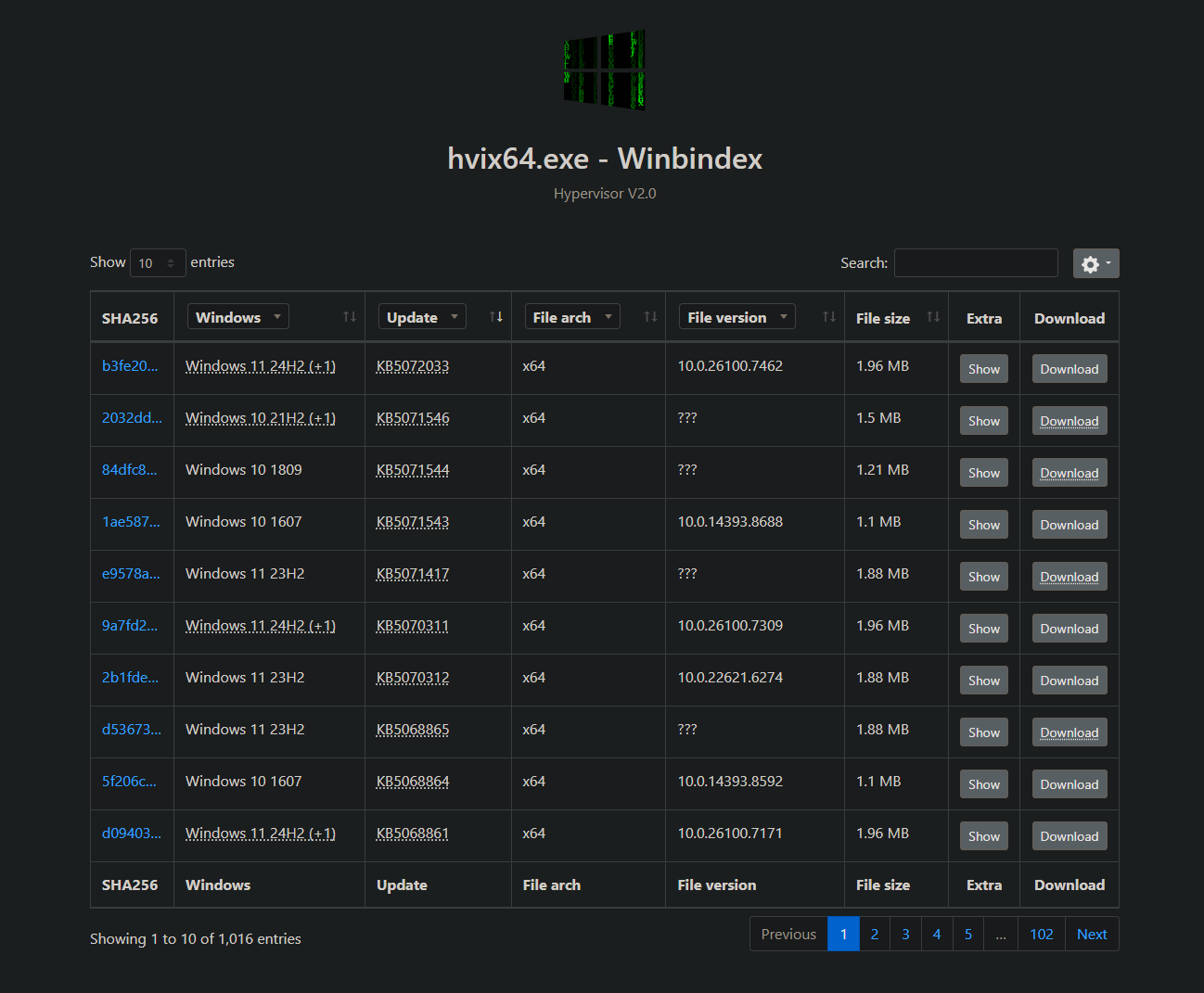
Hyper-V’s logic sits in one of two binaries, hvix64.exe for Intel based systems and hvax64.exe for AMD based systems. I will focus on hvix. To check compatibility between different versions I will use winbindex that is basically a repository of Microsoft files in one place.
Reversing hvix64.exe
VMCS Util Functions
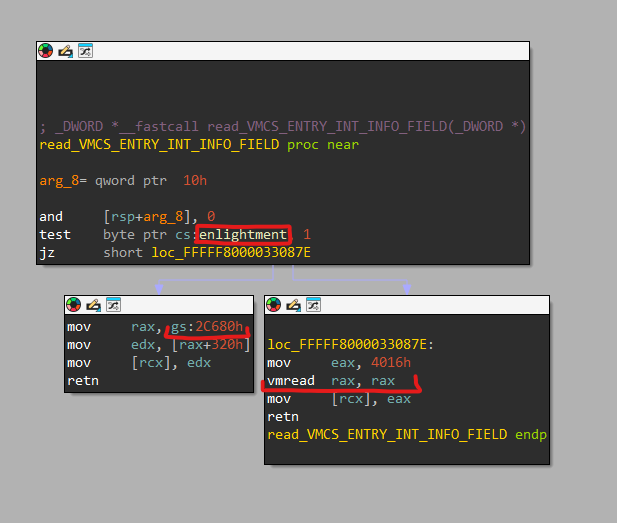
As I said earlier the key to understanding complex handlers and inner Hyper-V logic is to understand it’s context grabbing ways and utility functions. Almost all guest-related functions use this kind of util function to read or write data from/to the guest’s context. If we are currently handling the enlightened partition we can just grab what we want from the current virtual processor set VMCS, and if not, we can use vmread to read straight from the guest’s VMCS.
Inner Structures
Like the VMCS, we have a lot of internal structures that are not really published anywhere that Hyper-V uses to execute it’s logic. To understand these we will need to either reverse them, look online for references or even try to grab them straight from memory.

Above is the struct hierarchy inside Hyper-V, now I will add a few words about each level.
Virtual Processor
The “main”/”root” struct is the vp or the current virtual processor. This structure has information about the VTLs currently running, their info, guest machine’s context, current and VTL-specific VMCS data and values and so much more. Given this, it is a huge struct, and without access to the actual source code we will never know it’s true values, offsets and powers (and also well have to suffer resolving offsets per windows minor version). Although, this appears to not change a whole lot between versions and the major decisions about the vp architecture are already made and implemented inside Hyper-V.
There is also a MSR - HV_... to read the current VP index.
Resolving the VP
To resolve the current virtual processor, Hyper-V uses the gs segment register at the 0 index and then derefs it in offset 0x368 (25H2) to get the virtual processor struct.
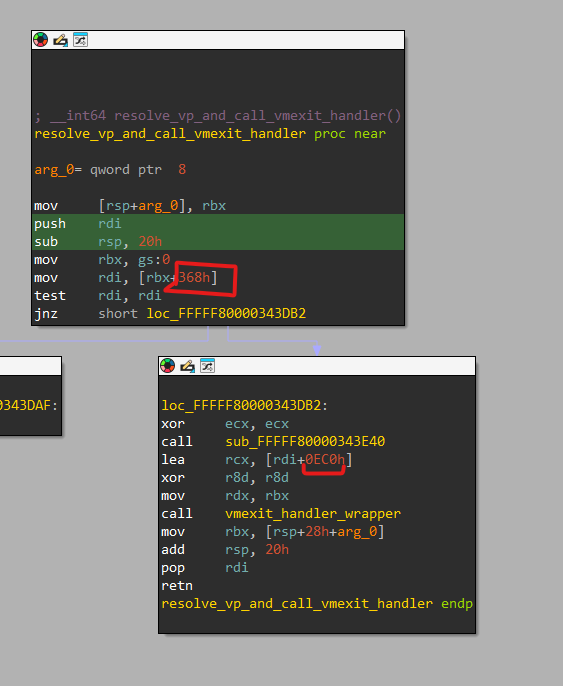
Note that the VMExit handler only receives the guest_context as a parameter (the second highlight in the screenshot above, offset oxec0) and only later on uses CONTAINING_RECORD to get the full virtual processor structure.

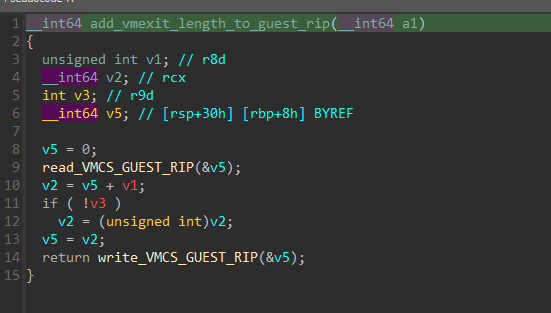
The structure holds important context members, like the current VTL, the current context, and the VMExit instruction length (to know to jump rip forward).

Transitioning between VTLs
The vp is also used to grab VTL specific data like context and used to transition between VTLs (for example when a vmcall/hypercall is executed).

VMCS
The Virtual Machine Control Structure is used a lot to modify partition context and to control handler logic based on the guest’s context. Obviously, this big struct can change between hypervisor/version but we can count on a general layout/protocol that is followed. For quick offset check like the ones in the above section I used Google’s Rekall.
Extracting VMCS dynamically
There are also memory scanners online that can be run from the UEFI Shell, these memory scanners can find the vmx region and dump VMCS context to later validate the VMCS layout we believe is used.
VTL Information
There is also a VTL_PRIVATE_DATA and VTL_DESCRIPTOR structs that can be resolved straight from the vp. These include important information like the VMCS of said VTLs.
Partition Information
There is also the “root” partition struct that includes many inner fields used for information grabbing, the below example is resolving the privileges of a partition and checking for the Debugging privilege bit.
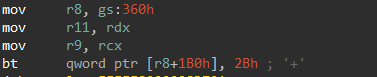
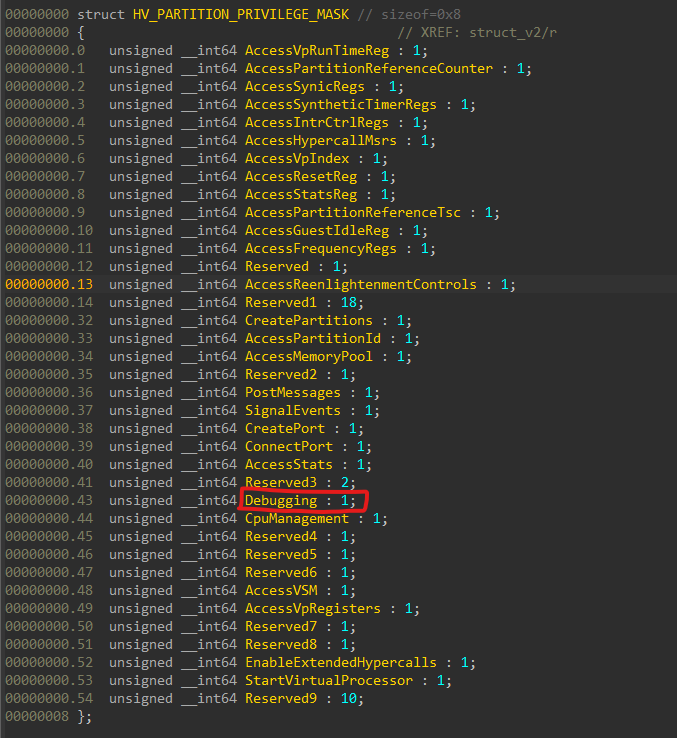
As you can see the partition information is at the “root” gs register unlike the vp, that is resolved via gs:0.
VMExit Handler
Exit Reasons
The VMExit handler is basically a large switch(){case} statement that handles all reasons of a VMExit, to find all said reasons we can look into the intel manual


I’ve created a enum to easily apply this into IDA
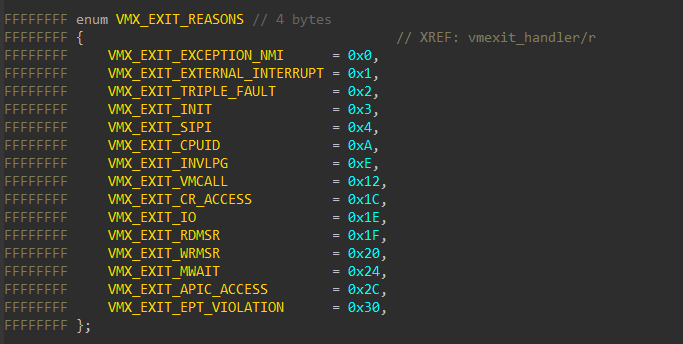
These are not all available/defined exit reasons, but these are the ones in the actual handler code.
Defining MSRs for the wrmsr/rdmsr Exit Reason
Certain MSRs also cause a unconditional VMExit, so the handler must check which MSR was interacted with and act accordingly, I extracted a few of the easier MSR codes from the intel manual, online documentation.
1
2
3
4
5
6
7
8
9
10
11
12
13
14
15
16
17
18
19
20
21
22
23
24
25
26
27
28
29
30
31
32
33
34
35
36
37
38
39
40
41
42
43
44
45
46
47
48
49
50
51
52
53
54
55
56
57
58
59
60
61
62
63
64
65
66
67
68
69
70
enum MSR_NAMES // 4 bytes
{
    IA32_SPEC_CTRL                   = 0x48,
    IA32_PRED_CMD                    = 0x49,
    IA32_FLUSH_CMD                   = 0x8B,
    IA32_MISC_ENABLE                 = 0x1A0,
    IA32_FS_BASE                     = 0xC0000100,
    IA32_GS_BASE                     = 0xC0000101,
    IA32_KERNEL_GS_BASE              = 0xC0000102,
    HV_X64_MSR_GUEST_OS_ID           = 0x40000000,
    HV_X64_MSR_HYPERCALL             = 0x40000001,
    HV_X64_MSR_VP_INDEX              = 0x40000002,
    HV_X64_MSR_RESET                 = 0x40000003,
    HV_X64_MSR_VP_RUNTIME            = 0x40000010,
    HV_X64_MSR_TIME_REF_COUNT        = 0x40000020,
    HV_X64_MSR_REFERENCE_TSC         = 0x40000021,
    HV_X64_MSR_TSC_FREQUENCY         = 0x40000022,
    HV_X64_MSR_APIC_FREQUENCY        = 0x40000023,
    HV_X64_MSR_EOI                   = 0x40000070,
    HV_X64_MSR_ICR                   = 0x40000071,
    HV_X64_MSR_TPR                   = 0x40000072,
    HV_X64_MSR_VP_ASSIST_PAGE        = 0x40000073,
    HV_X64_MSR_SCONTROL              = 0x40000080,
    HV_X64_MSR_SVERSION              = 0x40000081,
    HV_X64_MSR_SIEFP                 = 0x40000082,
    HV_X64_MSR_SIMP                  = 0x40000083,
    HV_X64_MSR_EOM                   = 0x40000084,
    HV_X64_MSR_SIRBP                 = 0x40000085,
    HV_X64_MSR_SINT0                 = 0x40000090,
    HV_X64_MSR_SINT1                 = 0x40000091,
    HV_X64_MSR_SINT2                 = 0x40000092,
    HV_X64_MSR_SINT3                 = 0x40000093,
    HV_X64_MSR_SINT4                 = 0x40000094,
    HV_X64_MSR_SINT5                 = 0x40000095,
    HV_X64_MSR_SINT6                 = 0x40000096,
    HV_X64_MSR_SINT7                 = 0x40000097,
    HV_X64_MSR_SINT8                 = 0x40000098,
    HV_X64_MSR_SINT9                 = 0x40000099,
    HV_X64_MSR_SINT10                = 0x4000009A,
    HV_X64_MSR_SINT11                = 0x4000009B,
    HV_X64_MSR_SINT12                = 0x4000009C,
    HV_X64_MSR_SINT13                = 0x4000009D,
    HV_X64_MSR_SINT14                = 0x4000009E,
    HV_X64_MSR_SINT15                = 0x4000009F,
    HV_X64_MSR_NESTED_SCONTROL       = 0x40001080,
    HV_X64_MSR_NESTED_SVERSION       = 0x40001081,
    HV_X64_MSR_NESTED_SIEFP          = 0x40001082,
    HV_X64_MSR_NESTED_SIMP           = 0x40001083,
    HV_X64_MSR_NESTED_EOM            = 0x40001084,
    HV_X64_MSR_NESTED_SINT0          = 0x40001090,
    HV_X64_MSR_STIMER0_CONFIG        = 0x400000B0,
    HV_X64_MSR_STIMER0_COUNT         = 0x400000B1,
    HV_X64_MSR_STIMER1_CONFIG        = 0x400000B2,
    HV_X64_MSR_STIMER1_COUNT         = 0x400000B3,
    HV_X64_MSR_STIMER2_CONFIG        = 0x400000B4,
    HV_X64_MSR_STIMER2_COUNT         = 0x400000B5,
    HV_X64_MSR_STIMER3_CONFIG        = 0x400000B6,
    HV_X64_MSR_STIMER3_COUNT         = 0x400000B7,
    HV_X64_MSR_GUEST_IDLE            = 0x400000F0,
    HV_X64_MSR_CRASH_P0              = 0x40000100,
    HV_X64_MSR_CRASH_P1              = 0x40000101,
    HV_X64_MSR_CRASH_P2              = 0x40000102,
    HV_X64_MSR_CRASH_P3              = 0x40000103,
    HV_X64_MSR_CRASH_P4              = 0x40000104,
    HV_X64_MSR_CRASH_CTL             = 0x40000105,
    HV_X64_MSR_REENLIGHTENMENT_CONTROL = 0x40000106,
    HV_X64_MSR_TSC_EMULATION_CONTROL = 0x40000107,
    HV_X64_MSR_TSC_EMULATION_STATUS  = 0x40000108,
    HV_X64_MSR_TSC_INVARIANT_CONTROL = 0x40000118,
};
Grabbing the vmcall/Hypercall Codes
Another case should be the using a vmcall to execute some hypercall or to transition between VTLs.
1
2
3
4
5
6
7
8
9
10
11
12
13
14
15
16
17
18
19
20
21
22
23
24
25
26
27
28
29
30
31
32
33
34
35
36
37
38
39
40
41
42
43
44
45
46
47
48
49
50
51
52
53
54
55
56
57
58
59
60
61
62
63
64
65
66
67
68
69
70
71
72
73
74
75
76
77
78
79
80
81
82
83
84
85
86
87
88
89
90
91
92
93
94
95
96
97
98
99
100
101
102
103
104
105
106
107
108
109
110
111
112
113
114
115
116
117
118
119
120
121
122
enum HV_CALL_CODE // 4 bytes
{
    HvCallReserved0000               = 0x0,
    HvCallSwitchVirtualAddressSpace  = 0x1,
    HvCallFlushVirtualAddressSpace   = 0x2,
    HvCallFlushVirtualAddressList    = 0x3,
    HvCallGetLogicalProcessorRunTime = 0x4,
    HvCallDeprecated0005             = 0x5,
    HvCallDeprecated0006             = 0x6,
    HvCallDeprecated0007             = 0x7,
    HvCallNotifyLongSpinWait         = 0x8,
    HvCallParkLogicalProcessors      = 0x9,
    HvCallInvokeHypervisorDebugger   = 0xA,
    HvCallReserved000b               = 0xB,
    HvCallReserved000c               = 0xC,
    HvCallReserved000d               = 0xD,
    HvCallReserved000e               = 0xE,
    HvCallReserved000f               = 0xF,
    HvCallReserved0010               = 0x10,
    HvCallVtlCall                    = 0x11,
    HvCallVtlReturn                  = 0x12,
    HvCallReserved0013               = 0x13,
    HvCallReserved0014               = 0x14,
    HvCallReserved0015               = 0x15,
    HvCallReserved0016               = 0x16,
    HvCallReserved0017               = 0x17,
    HvCallReserved0018               = 0x18,
    HvCallReserved0019               = 0x19,
    HvCallReserved001a               = 0x1A,
    HvCallReserved001b               = 0x1B,
    HvCallReserved001c               = 0x1C,
    HvCallReserved001d               = 0x1D,
    HvCallReserved001e               = 0x1E,
    HvCallReserved001f               = 0x1F,
    HvCallReserved0020               = 0x20,
    HvCallReserved0021               = 0x21,
    HvCallReserved0022               = 0x22,
    HvCallReserved0023               = 0x23,
    HvCallReserved0024               = 0x24,
    HvCallReserved0025               = 0x25,
    HvCallReserved0026               = 0x26,
    HvCallReserved0027               = 0x27,
    HvCallReserved0028               = 0x28,
    HvCallReserved0029               = 0x29,
    HvCallReserved002a               = 0x2A,
    HvCallReserved002b               = 0x2B,
    HvCallReserved002c               = 0x2C,
    HvCallReserved002d               = 0x2D,
    HvCallReserved002e               = 0x2E,
    HvCallReserved002f               = 0x2F,
    HvCallReserved0030               = 0x30,
    HvCallReserved0031               = 0x31,
    HvCallReserved0032               = 0x32,
    HvCallReserved0033               = 0x33,
    HvCallReserved0034               = 0x34,
    HvCallReserved0035               = 0x35,
    HvCallReserved0036               = 0x36,
    HvCallReserved0037               = 0x37,
    HvCallReserved0038               = 0x38,
    HvCallReserved0039               = 0x39,
    HvCallReserved003a               = 0x3A,
    HvCallReserved003b               = 0x3B,
    HvCallReserved003c               = 0x3C,
    HvCallReserved003d               = 0x3D,
    HvCallReserved003e               = 0x3E,
    HvCallReserved003f               = 0x3F,
    HvCallCreatePartition            = 0x40,
    HvCallInitializePartition        = 0x41,
    HvCallFinalizePartition          = 0x42,
    HvCallDeletePartition            = 0x43,
    HvCallGetPartitionProperty       = 0x44,
    HvCallSetPartitionProperty       = 0x45,
    HvCallGetPartitionId             = 0x46,
    HvCallGetNextChildPartition      = 0x47,
    HvCallDepositMemory              = 0x48,
    HvCallWithdrawMemory             = 0x49,
    HvCallGetMemoryBalance           = 0x4A,
    HvCallMapGpaPages                = 0x4B,
    HvCallUnmapGpaPages              = 0x4C,
    HvCallInstallIntercept           = 0x4D,
    HvCallCreateVp                   = 0x4E,
    HvCallDeleteVp                   = 0x4F,
    HvCallGetVpRegisters             = 0x50,
    HvCallSetVpRegisters             = 0x51,
    HvCallTranslateVirtualAddress    = 0x52,
    HvCallReadGpa                    = 0x53,
    HvCallWriteGpa                   = 0x54,
    HvCallAssertVirtualInterrupt     = 0x55,
    HvCallClearVirtualInterrupt      = 0x56,
    HvCallCreatePort                 = 0x57,
    HvCallDeletePort                 = 0x58,
    HvCallConnectPort                = 0x59,
    HvCallGetPortProperty            = 0x5A,
    HvCallDisconnectPort             = 0x5B,
    HvCallPostMessage                = 0x5C,
    HvCallSignalEvent                = 0x5D,
    HvCallSavePartitionState         = 0x5E,
    HvCallRestorePartitionState      = 0x5F,
    HvCallInitializeEventLogBufferGroup = 0x60,
    HvCallFinalizeEventLogBufferGroup = 0x61,
    HvCallCreateEventLogBuffer       = 0x62,
    HvCallDeleteEventLogBuffer       = 0x63,
    HvCallMapEventLogBuffer          = 0x64,
    HvCallUnmapEventLogBuffer        = 0x65,
    HvCallSetEventLogGroupSources    = 0x66,
    HvCallReleaseEventLogBuffer      = 0x67,
    HvCallFlushEventLogBuffer        = 0x68,
    HvCallPostDebugData              = 0x69,
    HvCallRetrieveDebugData          = 0x6A,
    HvCallResetDebugSession          = 0x6B,
    HvCallMapStatsPage               = 0x6C,
    HvCallUnmapStatsPage             = 0x6D,
    HvCallMapSparseGpaPages          = 0x6E,
    HvCallSetSystemProperty          = 0x6F,
    HvCallSetPortProperty            = 0x70,
    HvCallOutputDebugCharacter       = 0x71,
    HvCallEchoIncrement              = 0x72,
    HvCallPerfNop                    = 0x73,
    HvCallPerfNopInput               = 0x74,
    HvCallPerfNopOutput              = 0x75,
    HvCallCount                      = 0x76,
};
Reversing the General Flow
The first thing the handler does is resolving the vp straight from it’s guest_context pointer received from the stub we reversed earlier. As stated before, the virtual processor data struct is extremely important to all VMExit handling flow, and it is widely used in this handler.

Then the program while(true) is executed and the current VTL context is zeroed out (to account for VTL switching)

After that, we enter a “critical section” of some sorts to handle and check if an exception was thrown, and should be handled right now and re-injected before the exit reason switch case, the interrupt disabling is required to read from the the vp directly.

As expected, this code follows the _enable() and just exits the function if the logic above fails.

Now we’ve reached the start of the interesting logic, we first update the context in the vp and then transition between VTLs if needed, we will go into the VTL transition process later.
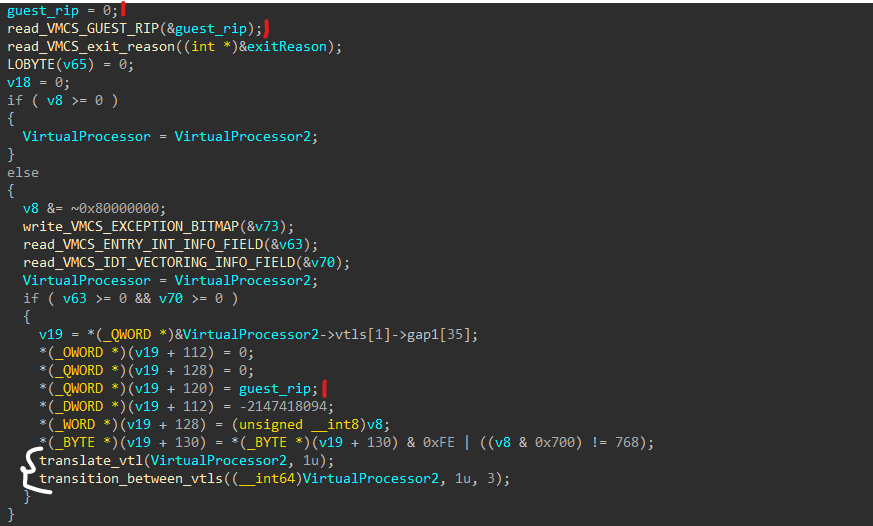
Now we just check the exit reason to be not EXTERNAL_INTERRUPT and if not, we can start checking the regular exit codes.
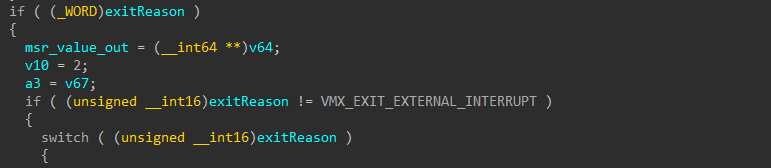
VMX_EXIT_INIT
The first case is the exit init, we just log the init signal and reboot the system


VMX_EXIT_CPUID
Nice, we got our first “real” case, when the guest executes cpuid a non-conditional VMExit occurs and the hypervisor gets context.
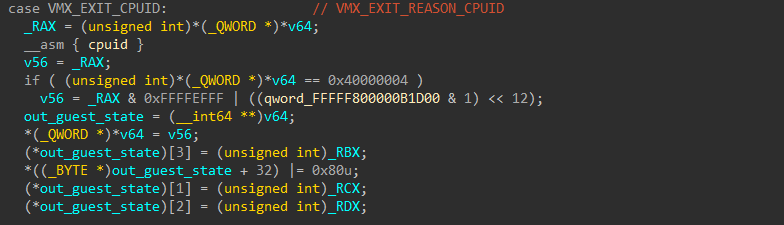
We can see that if the cpuid argument is 0x40000004 we mask out the RAX response before returning the user it’s results.
This is a great, even marvelous location to put our future hook in (!) we just need to automate finding this in runtime
VMX_EXIT_INVLPG
On invlpg we just resume the system, the invalidation already happened (we switched cr3 already)

VMX_EXIT_VMCALL
When getting a vmcall we call separate logic to distinguish between a classic hyper call and a “secure call”. There is this fantastic blog about it.

VMX_EXIT_CR_ACCESS
We are checking if cr3 is accessed and handling writes or MOVs to it differently by policy.

The first step is checking for cr3 and getting the policy.
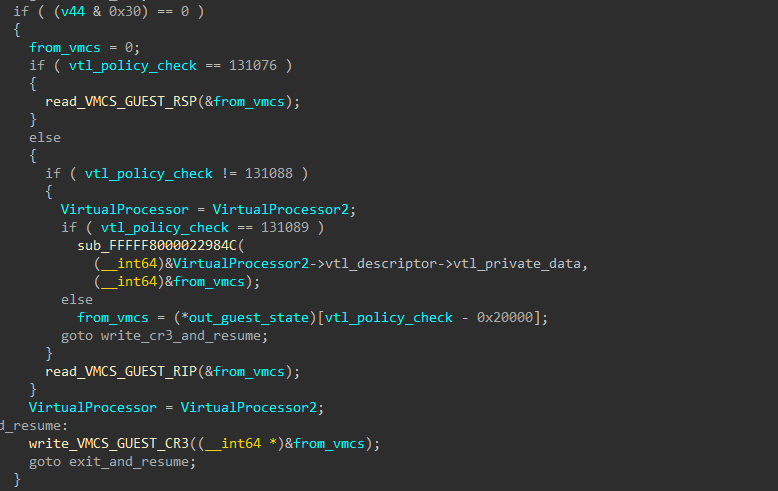
Now basing on the policy we handle the cr3 access differently, the simplest form being just writing to the VMCS->GUEST_CR3 field, and the other case bases it’s write on the current flags and policy.
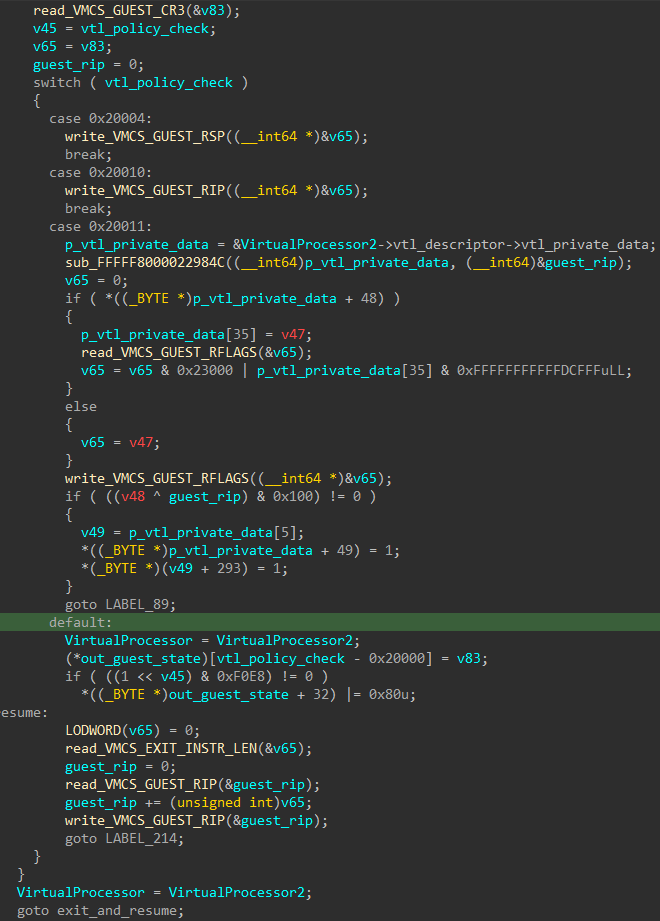
The most interesting case is the last, where the handler first updates all flags, stack pointer and flags on the VMCS based on the policy we read earlier. After we write to the cr3 we skip the VMExit length forward and continue execution.
VMX_EXIT_IO
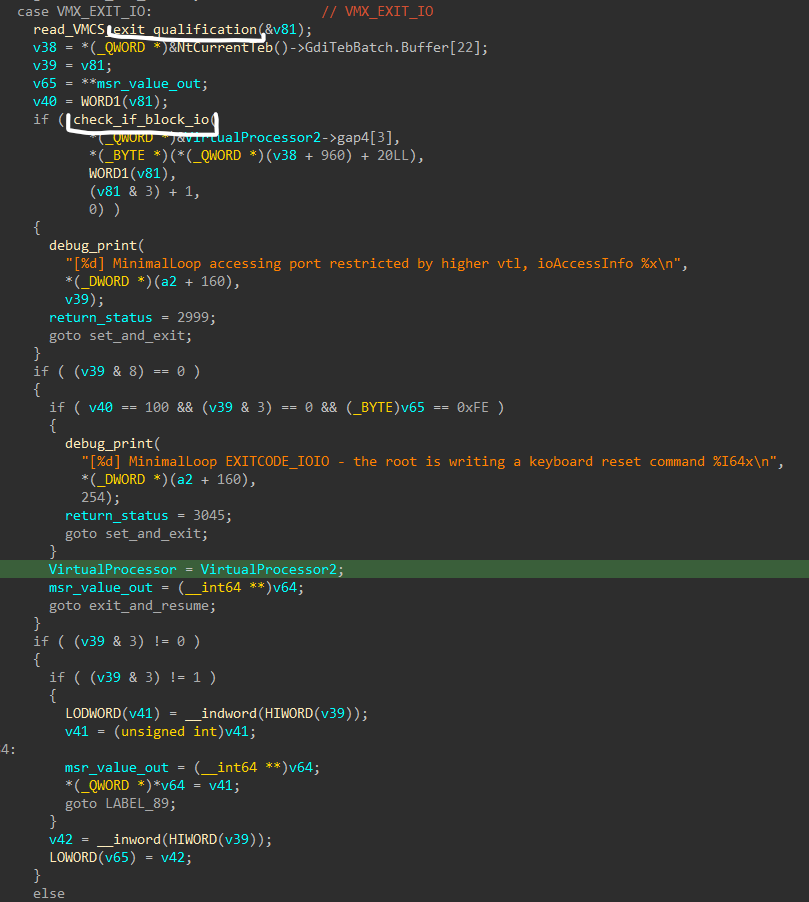
Checking if we policy block the io write attempt and if so return a fail status, else we use in to write to the io
VMX_EXIT_RDMSR/VMX_EXIT_WRMSR
To access MSRs the hypervisor first needs to check if you can access the more “privileged” MSRs by enlightened bits or not. Also, sometimes we need to return proprietary results to the OS because Hyper-V is running. We execute this logic in a few setps:
rdmsr/wrmsr (the example steps are on read, but write is close to it):
- Maps the user request to a inner MSR-code to later give a handler that will read/write from/to the MSR
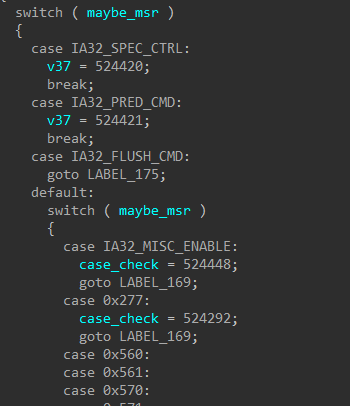
- For some Hyper-V values it reads from a cache/VP of sorts
reads the result from the handler or falls back to
rdmsron the host

VMX_EXIT_EPT_VIOLATION
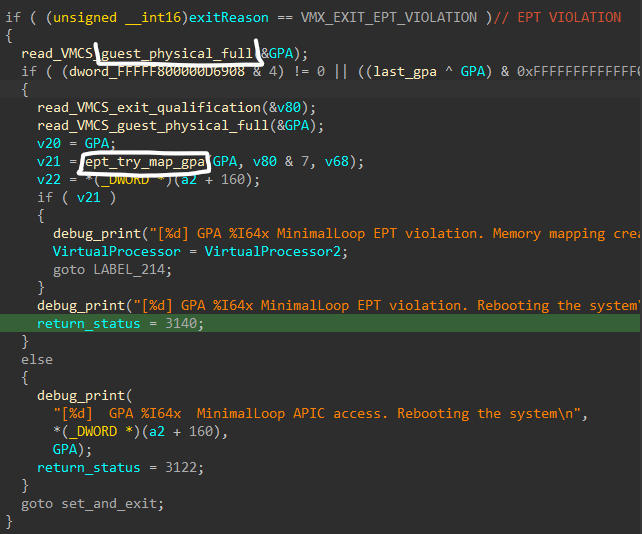
When an EPT violation happens, we first try to map it to the guest if that doesn’t work we fail.
This is another great location to intervene later. We can set custom maps for custom EPT hooks for my project.
Pseudo Code (Extermely Simplified)
1
2
3
4
5
6
7
8
9
10
11
12
13
14
15
16
17
18
19
20
21
22
23
24
25
26
27
28
29
30
31
32
33
34
35
36
37
38
39
40
41
42
43
44
45
46
47
48
49
50
51
52
53
54
55
56
57
58
59
60
61
62
63
64
65
66
67
68
69
70
71
72
73
74
75
76
77
78
79
80
81
82
83
84
85
86
87
88
89
90
91
92
93
94
95
96
97
98
99
VirtualProcessor = CONTAINING_RECORD(guest_state_param, VIRTUAL_PROCESSOR, guest_context);

while(true)
{
	__asm__("cli");
	// Use Virtual Processor
	__asm__("sti");

	switch_vtls_if_needed(vp);

	switch(current_vmcs->exitReason)
	{
		case VMX_EXIT_INIT:
			debug_print(...);
			status = INIT_EXIT_STATUS;

			goto set_and_exit;
		case VMX_EXIT_CPUID:
			rax = guest_context->rax;
			__asm__("cpuid");
			mask_out_values_fill_in_hypervisor();
			fill_guest_context_register_results(); -> inline

			break;
		case VMX_EXIT_INVLPG:
			break;
		case VMX_EXIT_VMCALL:
			handle_vmcall(vp); // Switch case on the hypercall status

			break;
		case VMX_EXIT_CR_ACCESS:
			if (vmcs->exit_qualificaiton & CR_MASK == 3) //CR3
			{
				if (check_cr_access(policy))
				{
					goto fail_cr;
				}

				read_write_cr3_policy();
			}

			break;
		case VMX_EXIT_IO:
			if (check_if_io_restricted(io_port_request, vp))
			{
				status = IO_BLOCKED_STATUS;

				goto set_and_exit;
			}

			if (check_size_of_io_request(io_port_request) == sizeof(DWORD))
			{
				__indword(request->port);

				break;
			}

			__inbyte(request->port)

			break;
		case VMX_EXIT_RDMSR/VMX_EXIT_WRMSR:
			mask_out_hyperv_msrs(MSR_NUMBER);

			__readmsr/__writemsr...

			break;
		...
	}

	if (current_vmcs->exitReason == VMX_EXIT_EPT_VIOLATION)
	{
		if (check_ranges(current_vmcs->gpa))
		{
			if (!ept_map_gpa(current_vmcs->gpa))
			{
				debug_print(...);
				status = EPT_MAP_FAILED;

				goto set_and_exit;
			}

			debug_print(...);

			break;
		}
		else
		{
			debug_print(...);
			status = INVALID_ADDRESS;

			goto set_and_exit;
		}
	}
}

__asm__("sti");

return status;
How Does One Switch VTLs?
We already discussed that the VMExit handler does VTL transitions if needed. There are 2 sections that VTL transition can happen in a regular VMExit handling, at the start of the handler, or after a VMCALL is executed and we need to switch VTLs to supply information/move the OS from VTL0 to VTL1 or vice versa. Below is the first example, we will take a look at first function, because it does most of the logic, like switching VMCS and changing the vp’s current VTL descriptor.
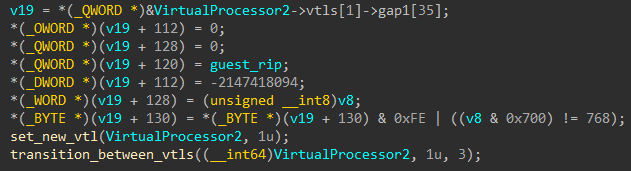
The set_new_vtl function does as expected, it resolves the VTL descriptor from the current processor and checks if a VTL transition should happen, and if so, it passes it to a sub-function that takes in the self (gs:0), vp and the new VTL index to switch too (1 in this case).

The second function is more complicated, it sets a few MSRs and configures the system to the switch itself, but the important part for this blog’s scope is the switching of the current VMCS that is stored inside the VTL private data structure.

Automation
Now, after understanding the general Hyper-V internal architecture and VMExit handling, we want to add a VMM component to my educational malware. To do this, we will need to scan and find the VMExit handler bytes from the hvix64.exe binary on disk and supply the patched bootloader with the offset to the VMExit handler, to know where to place the hook.
My Malware Architecture
In the 3rd part of this article, I will add a boot/hypervisor component to the already existing educational rootkit in the following order:
- The first stage,
Arcane.exewill get running and deploy the second stage Primal.syswill be deployed and by sending a persistency IOCTL we’ll deploy the third stage- The bootloader will be replaced (on non secure boot systems) and I will take over and hook Hyper-V at runtime, thus providing defense to my first 2 stages and boot-level persistency.
To do this, I will need to first locate the place I want to hook, the VMExit handler from the disk binary of hvix64.exe, find the offset from the start of the .text section and patch Hyper-V after it’s loaded in the boot stage.
Scanning for the VMExit Handler on Disk
I will try to scan for the vmwrite instruction at the end of the VMX_EXIT_WRMSR block with the same operands, hoping that these don’t change between hvix64.exe versions (I will check for this later).


Now, I will need to find all occurances of these 3 bytes and go upwards to find the base of the VMExit handler function. I will try to scan for the start of the function.
Like stated in “Cracking Assembly” I can search for the function prolog, or specifically the aligning of the stack for the local variables, or in this case 48 81 ec ?? ?? ?? ??, this should be unique and be only in the closest upwards facing function prolog.
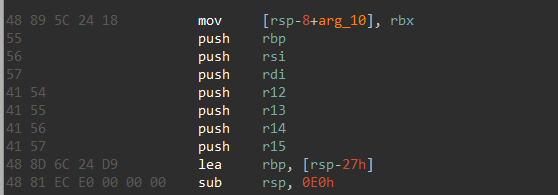
- add scanning for cli instruction in the way as well
- add scanning for one function arg as well
Python Code
1
2
3
4
5
6
7
8
9
10
11
12
13
14
15
16
17
18
19
20
21
22
23
24
25
26
27
28
29
30
31
32
33
34
35
import re
import sys
import pefile

VMWRITE = b"\x0F\x79\xC3"
CLI_MOV = b"\xFA\x8A\x05"

MAX_BACK = 0x2000

def main(path):
    pe = pefile.PE(path, fast_load=True)
    pe.parse_data_directories()

    text = next(s for s in pe.sections if b".text" in s.Name)
    data = text.get_data()

    for m in re.finditer(VMWRITE, data):
        start = max(0, m.start() - MAX_BACK)
        window = data[start:m.start()]

        padding_regex = rb"(\xCC{3,})"
        padding_addresses = list(re.finditer(padding_regex, window))
        vmexit_handler_candidate = padding_addresses[-1].end() + start

        if CLI_MOV not in data[vmexit_handler_candidate:m.start()]:
            continue

        print(f".text+0x{vmexit_handler_candidate:x}")


if __name__ == "__main__":
    if len(sys.argv) != 2:
        sys.exit("Usage: find_vmexit.py path/to/hvix64.exe")

    main(sys.argv[1])
This is the same logic I will use later in cpp to resolve the offset of the VMExit handler in the stages before the bootkit, to later supply them to the bootkit and load the hook nicely.
Seems like Microsoft removed the hvix64.exe binaries from their symbol server :(

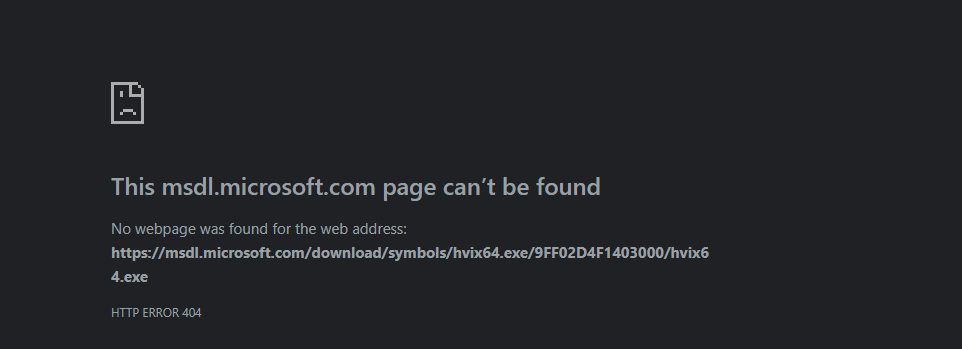
So for now this will have to work, and you’ll have to trust me that this logic should work on other versions (max we change the consts).
Debugging Setup
I installed a Windows 11 virtual machine on VMWare Workstation and enabled virtualization and Hyper-V. After that I configured a working GDB stub and connected to it via IDA. This will be our way of debugging our boot-level/VMM-level code in the later parts of this project.
Turn for the Worst
Even though I managed to create a VM with virtualization and VBS turned on (without secure boot) VMWare still validates boot code at the EFI partition before actually continuing the setup process. Meaning, I probably have to get a real hardware machine :(
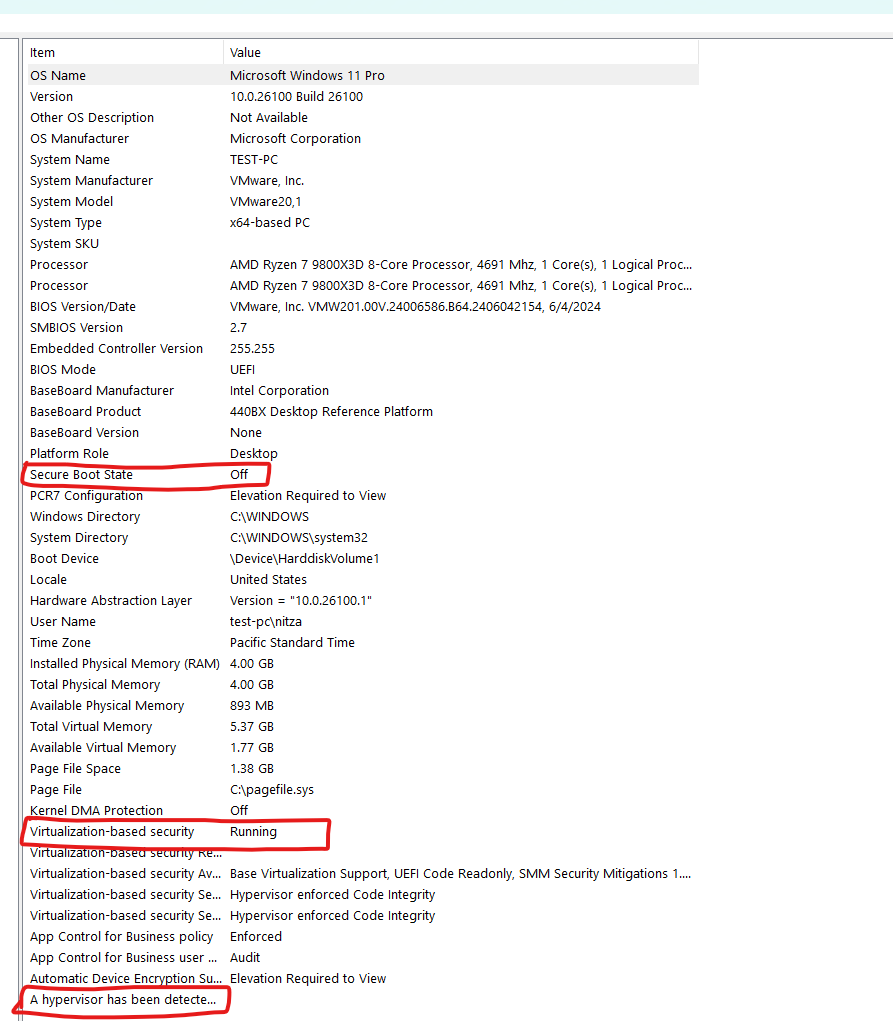

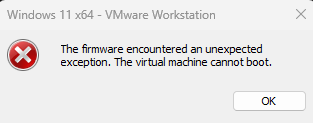
The next papers will have a proper debugging/lab setup using an old machine.
Attack Surface & Advanced Research Leads
I will list below a few of the attack surfaces and leads I can come up with after reversing some of hvix64.exe
- Boot level vulnerabilities - If an attacker finds a vulnerability in a boot loader that is signed by Microsoft, he can use it to load himself before the hypervisor, thus taking control at the boot level after
ExitBootServices. - SMM level vulnerabilities - can result in code execution in ring -2 and even finding code execution in some peripheral devices (no IOMMU).
- Race conditions when
VMX_EXIT_EPT_VIOLATIONhappens - can be interesting. - Racing using other CPU cores to beat the
sti. - Trying to force a reboot from a particular case.
- Playing with MSRs and checking if Hyper-V masks all of the important ones.
Interesting Concepts for Hypervisor Detection
The second part of this blog and my past researches include stealthy blue-pill hypervisor detection from UM. I believe a few lessons from the reversing done in this blog can be taken and applied to a more extensive detection project.
- MSRs.
- Triggering
EPTmaps -> timing. - Control registers - needs kernel mode.